Building a Modern Low-Power Homelab: Storage, Compute and Security Lab Design
A design-led walkthrough of refreshing aging homelab equipment into a low-power, resilient platform for data protection, security tooling and proof-of-concept work.
Objective
This homelab project started with a clear set of objectives.
The existing equipment in use was in need of a refresh. For storage I was using a QNAP 253be with 8GB of ram. I ran a few services to consume media on that NAS, namely Logitech Media Server, amongst others. The NAS was primarily used to backup photos and videos and used it to backup various cloud drives (Microsoft One Drive and Proton Drive). Due to the age of the NAS, there was a concern, the unit would fail and therefore would lose access to my data. As I was using a QNAP, if this scenario were to occur, it would force me to procure another QNAP to maintain access to data. For virtual machines or containers, I had an old machine with limited compute that allowed for the running of light virtual machines and docker containers. I needed a new solution to address the riks of losing data, avoid vendor lock in whilst having the right balance of low power / performance. At the same time, I wanted a flexible environment where I could experiment with security tooling, run proof-of-concepts, test infrastructure patterns and host virtual machines and containers without relying on a single all-in-one box.
The aim was not simply to buy new hardware. The aim was to design a small, efficient, resilient homelab platform with a clean separation between storage and compute. After much research the suggested design would look something like this
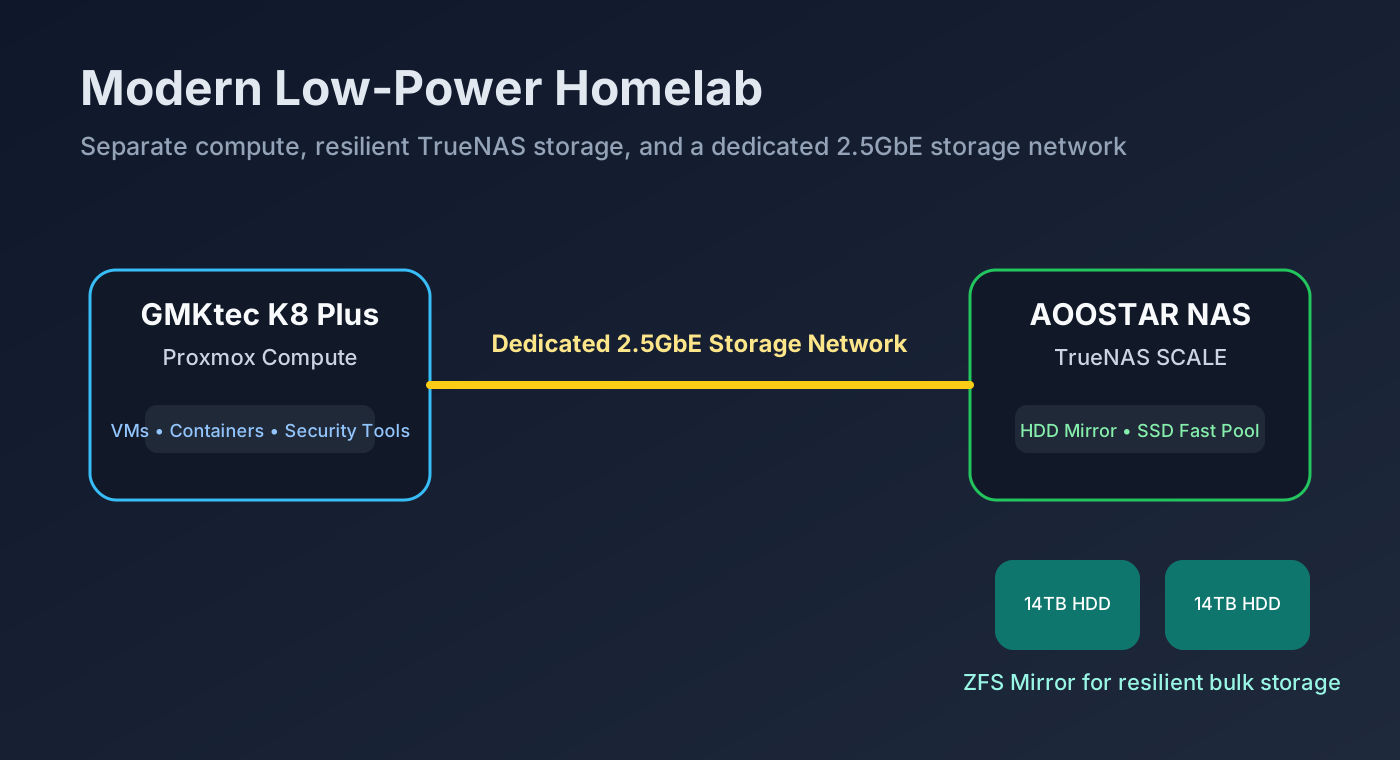 High-level target architecture: dedicated storage, dedicated compute and a separate high-speed storage path.
Design Principles
The design was guided by the following principles:
- Low power consumption
- Separation of compute and storage
- Redundancy for important data
- Enough performance to run security tooling, containers and proof-of-concept workloads
- Data portability / no vendor locking
A homelab runs for long periods, often 24/7, so power efficiency matters. The design therefore favoured mobile-class CPUs and compact systems rather than traditional desktop or enterprise server hardware.
At the same time, I did not want to compromise too much on capability. A very low-power board is attractive, but if it lacks RAM headroom, storage flexibility or enough CPU performance, it quickly becomes limiting.
Should I lose the underlying hardware, it should be possible to read disks on any hardware, without being forced into an NAS ecosystem.
Why Separate Compute from Storage?
One of the most important design decisions was to separate compute from storage.
flowchart LR
    user[Users / Devices] --> lan[Home LAN]
    lan --> compute[GMKtec K8 Plus<br/>Proxmox Compute]
    compute --> san[Dedicated 2.5GbE<br/>Storage Network]
    san --> nas[AOOSTAR NAS<br/>TrueNAS SCALE]
    nas --> hdd[HDD Mirror<br/>Bulk Storage]
    nas --> ssd[SSD Mirror<br/>Fast Pool]
This gives several advantages:
- Compute can be upgraded independently of storage.
- Storage can be managed as a dedicated TrueNAS platform.
- VM and container workloads can consume shared storage over a dedicated network.
- A failure or rebuild in one layer does not require redesigning the whole environment.
This approach is closer to a small enterprise pattern: compute nodes on one side, resilient shared storage on the other.
Storage Platform Options Considered
Several options were considered for the storage layer.
DIY Ryzen NAS Motherboard
A self-build Ryzen NAS board was attractive. Ryzen 7 5825U-class boards offer strong performance per watt, and some embedded NAS boards provide multiple SATA ports and NVMe slots.
The downside was sourcing and build complexity. Many suitable boards are sold through AliExpress, eBay or small OEM channels, often with variable documentation, BIOS quirks and uncertain long-term support. A self-build would also require a case, PSU, cooling, cabling and more validation.
This was flexible, but it added hassle, and escalating costs when compared to new NAS solution that have come on the market, offering the flexibility to run any operating systems on them.
UGREEN DXP4800 Base / Plus / Pro
The UGREEN DXP4800 range was also considered. These devices provide a polished appliance-style experience, modern hardware, multiple bays and, on higher models, useful networking options such as 10GbE on higher end models.
The base DXP 4800 had a N100 processes, had the best in terms of low power consumption, but had limited performance. The Plus and Pro models, favours performance, but at the cost of consuming more power. The Ryzen 5825U class of NAS offered the low power / performance / cost balance compared to the UGREEN Devices.
The UGREEN NAS, to their favour are open and allow for 3rd party Operating Systems and NAS stype distros to be be installed on them.
Zimaboard 2
The Zimaboard 2 was an interesting proposition, it ran the Intel N150, so was low power and could be bundled with a NAS kit, allowing for 2 NVME drives, and 2 SATA drives, 2x 2.5 GB network interface cards. The ZimaOS seemed to have good functionality and the device dis support running 3rd party NAS distros on them.
Unfortunately due to the following the Zimaboard 2 was ruled out:
- Soldered RAM 16GB (no flexibility)
- Limited number of drives
This board could be ideal hardware to run an open-source firewall such as Pfsence, Opnsence, OpenWRT etc.
AOOSTAR WTR Pro
The AOOSTAR WTR Pro provided the best balance for this project.
It offered:
- Ryzen 7 5825U performance
- Four 3.5-inch drive bays
- Dual NVMe slots
- Dual 2.5GbE networking
- A compact NAS form factor
- The ability to install TrueNAS SCALE
- Low power
This made it the right compromise: close to DIY flexibility, but without the friction of building the NAS completely from individual parts.
Why TrueNAS on AOOSTAR?
The plan is to install TrueNAS SCALE on the AOOSTAR rather than use it as a generic mini PC or appliance.
TrueNAS gives:
- ZFS storage
- snapshots
- replication
- dataset-level control
- SMB/NFS sharing
- good visibility into pool health
- a mature storage management interface
- no hardware vendor lock in
For this project, the AOOSTAR becomes a dedicated storage appliance running an open and well-understood storage platform.
Initial Storage Design
The first storage phase uses two 14TB 3.5-inch disks.
These will be configured as a ZFS mirror.
flowchart TD
    subgraph AOOSTAR["AOOSTAR TrueNAS Storage"]
        subgraph HDDPOOL["Pool: tank"]
            hdd1["14TB HDD"] --- mirror["Mirror vdev"]
            hdd2["14TB HDD"] --- mirror
        end
        boot["Small NVMe<br/>TrueNAS boot"]
    end
A mirror was chosen because it provides:
- redundancy
- simple recovery
- good read performance
- an easy expansion path later
With two 14TB disks mirrored, usable capacity is roughly one disk worth of storage, but either disk can fail without losing the pool.
This is a deliberate trade-off: capacity is reduced, but resilience improves.
Future Fast Storage Tier
The AOOSTAR has two remaining SATA slots that can later be populated with two SATA SSDs.
Rather than mixing SSDs and HDDs in the same ZFS pool, the better design is to create a separate mirrored SSD pool.
flowchart LR
    subgraph TrueNAS["TrueNAS Storage"]
        subgraph Bulk["HDD Pool: tank"]
            h1["14TB HDD"] --- hm["Mirror"]
            h2["14TB HDD"] --- hm
        end

        subgraph Fast["SSD Pool: fast"]
            s1["SATA SSD"] --- sm["Mirror"]
            s2["SATA SSD"] --- sm
        end
    end

    Bulk --> archives["Backups<br/>Media<br/>Archives"]
    Fast --> workloads["VM disks<br/>Containers<br/>Databases<br/>Security tools"]
This avoids a common ZFS mistake.
ZFS does not automatically tier data between HDD and SSD in the way many people assume. If SSDs and HDDs are added as separate vdevs in the same pool, performance and data placement become less predictable.
Separate pools are clearer:
| Pool | Media | Purpose |
|---|---|---|
tank |
HDD mirror | Bulk storage, backups, media, archives |
fast |
SSD mirror | VMs, containers, databases, security tooling |
This gives predictable performance and makes it easier to decide what data belongs where.
NVMe Boot Strategy
A small NVMe drive will be used for the TrueNAS boot device.
A small boot NVMe makes sense because TrueNAS does not need a large or especially fast OS drive. Reliability matters more than capacity or headline speed.
The important design decision is to keep the boot device separate from the data pools.
The boot drive is replaceable. If it fails, TrueNAS can be reinstalled and the saved configuration restored. The data pools remain separate and importable.
Why Not Use NVMe as Cache Immediately?
It is tempting to use spare NVMe capacity as “cache”, but ZFS caching needs to be approached carefully.
For this build:
- L2ARC is not needed initially.
- SLOG is only useful for specific synchronous write workloads.
- A special vdev can improve metadata and small-file performance, but it should be mirrored because losing a special vdev can lose the entire pool.
Given the AOOSTAR has only two NVMe slots, the cleaner starting point is:
- one small NVMe for boot
- HDD mirror for bulk storage
- later, SATA SSD mirror as a separate fast pool
This keeps the design reliable and understandable.
Networking Design: Dedicated Storage Network
Both the AOOSTAR and the compute platform provide 2.5GbE networking.
This enables a simple but effective multi-homed design.
flowchart LR
    subgraph LAN["Home LAN"]
        users["Users / Clients"]
        switch["Main Switch"]
    end

    subgraph Compute["Compute Node"]
        c1["NIC 1<br/>LAN"]
        c2["NIC 2<br/>Storage"]
    end

    subgraph Storage["TrueNAS Node"]
        n1["NIC 1<br/>LAN / Management"]
        n2["NIC 2<br/>Storage"]
    end

    users --> switch --> c1
    switch --> n1
    c2 <--> n2
One interface can be used for normal LAN and management traffic. The second can be used for a dedicated storage network between compute and NAS.
This has several advantages:
- storage traffic does not compete with normal LAN traffic
- VM and container storage traffic can use a dedicated path
- backups and replication can be isolated
- throughput is maximised between compute and storage
In effect, this creates a small storage area network for the homelab.
Compute Platform Options Considered
The storage platform is only half of the design. The compute layer is where virtual machines, containers, security tools and lab workloads will run.
ZimaBoard 2
The ZimaBoard 2 was considered as a low-power compute option. It is attractive because it is compact and efficient.
However, for this project, it had limitations:
- lower CPU performance
- less flexibility for RAM-heavy workloads
- less headroom for multiple VMs and containers
It would be suitable for lightweight services, but less suitable as the main compute platform.
GMKtec K8 Plus
The chosen compute platform was the GMKtec K8 Plus.
It provides a much stronger balance:
- significantly better CPU performance
- more RAM flexibility
- NVMe storage
- compact form factor
- still relatively low power
The key point is that while it may draw slightly more power than lower-end compute boards, the performance and flexibility gain is substantial.
For this homelab, that trade-off is worthwhile.
Why Proxmox?
Several operating system options were considered for the compute node.
ZimaOS
ZimaOS is simple and appliance-like. It is useful for lightweight self-hosting, but it is not the best fit for a more flexible virtualisation platform.
VMware
VMware is mature and widely used, but licensing and long-term homelab flexibility are less attractive.
Proxmox VE
The final choice was Proxmox VE.
Proxmox provides:
- virtual machines
- Linux containers
- clustering options
- snapshot support
- good storage integration
- strong community support
- an enterprise-like operational model
For a security-focused homelab, Proxmox is a strong fit because it allows isolated environments to be built quickly and torn down safely.
Security Lab Use Cases
The final platform will support:
- vulnerability scanners
- security monitoring tools
- malware analysis sandboxes, where appropriate and isolated
- test Active Directory environments
- cloud and DevSecOps proof-of-concepts
- container security tooling
- network segmentation experiments
- infrastructure-as-code testing
The combination of Proxmox compute and TrueNAS storage gives enough flexibility to run realistic scenarios while keeping data protected.
Final Architecture
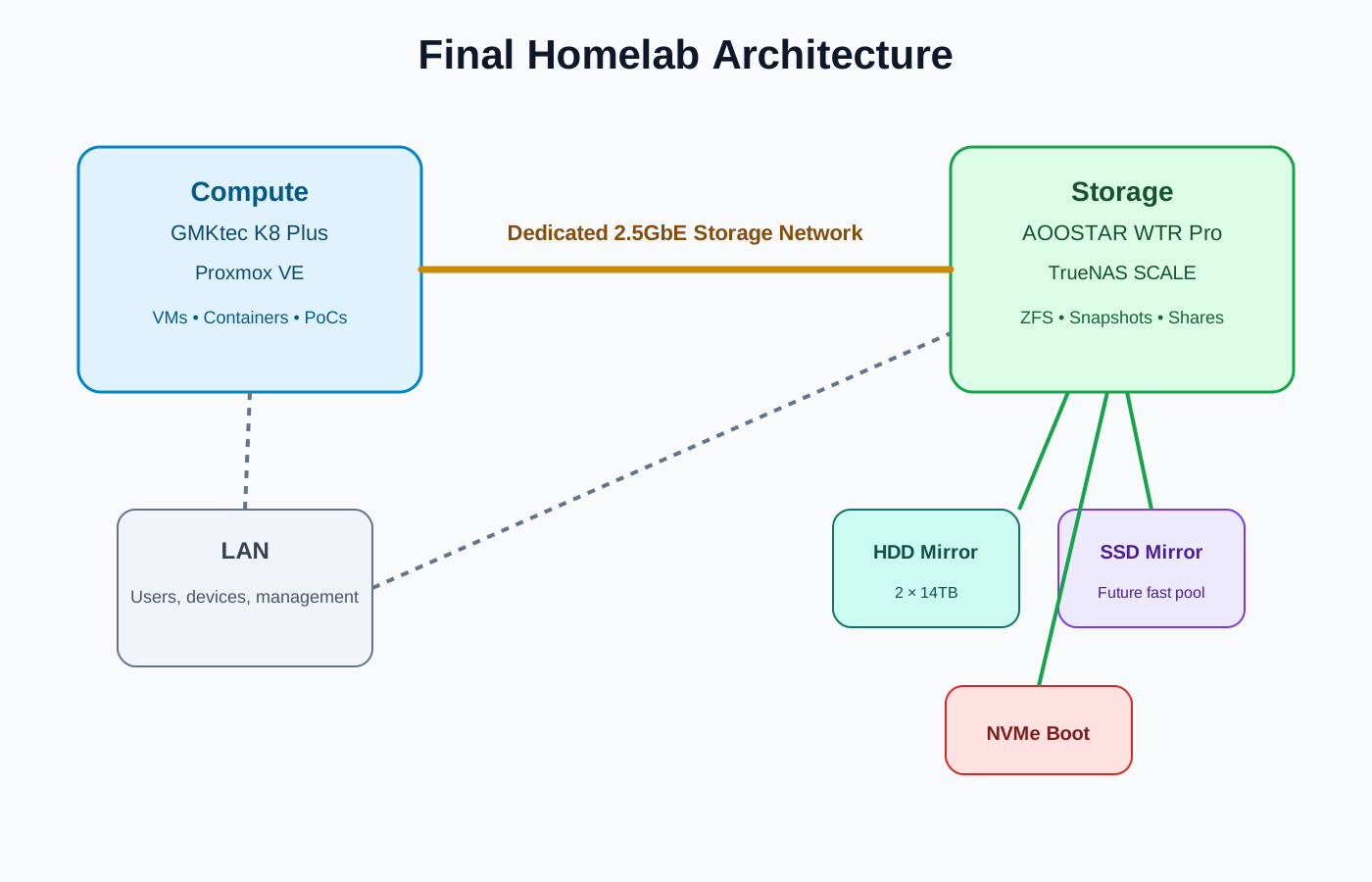
At a high level, the platform becomes:
- AOOSTAR running TrueNAS SCALE for storage
- GMKtec K8 Plus running Proxmox VE for compute
- HDD mirror for resilient bulk storage
- future SSD mirror for high-performance workloads
- dedicated 2.5GbE storage network between compute and NAS
Bill of Materials
Storage
| Component | Choice |
|---|---|
| NAS platform | AOOSTAR WTR Pro |
| Storage OS | TrueNAS SCALE |
| Bulk disks | 2 × 14TB 3.5-inch HDD |
| Bulk pool | ZFS mirror |
| Boot drive | Small NVMe SSD |
| Future fast tier | 2 × SATA SSD in mirror |
| Networking | Dual 2.5GbE |
Compute
| Component | Choice |
|---|---|
| Compute node | GMKtec K8 Plus |
| Virtualisation | Proxmox VE |
| RAM | 32GB or more, depending on workloads |
| Local storage | NVMe for OS and VM/container working storage |
| Networking | 2.5GbE, with dedicated storage path |
Supporting Infrastructure
| Component | Purpose |
|---|---|
| 2.5GbE switch or direct link | Storage network |
| UPS | Graceful shutdown and data protection |
| External backup target | Additional copy of critical data |
| Monitoring | Health, disk, temperature and service visibility |
Key Lessons
The main lesson from this design process is that homelab architecture should be driven by workload and risk, not just by hardware specifications.
For this build:
- AOOSTAR + TrueNAS gives a strong storage platform without full self-build complexity.
- Mirrored HDDs provide a simple and resilient starting point.
- A future mirrored SSD pool gives predictable high-speed storage.
- GMKtec K8 Plus offers better compute flexibility than very low-power boards.
- Proxmox provides the best balance of capability, openness and operational realism.
- Separating compute and storage makes the whole platform easier to scale and maintain.
Next Steps
This post covered the design process and final architecture.
The next parts of the series may cover cover:
- Physical build and hardware preparation
- Installing TrueNAS SCALE on the AOOSTAR
- Configuring the HDD mirror and datasets
- Installing Proxmox on the GMKtec K8 Plus
- Building the dedicated 2.5GbE storage network
- Implementing a local DevOps Toolchain and hosting of useful services and incorporating and Demonstrating DevSecOps principles, where appropriate
- Secrets Scanning
- Open Source Application Security Testing
- Static Analysis
- Dynamic Analysis
- Compliance as Code
- Deploying the first security lab workloads
- Explore Provenance within the Docker Eco-system
If there are already setup guides for these, there is no point re-iterating and these sections are likely to be skipped, however bespoke configuration to meet the needs Homelab will be discussed.
Note: Several days of research were conducted with the aid of an LLM, the page above is based upon a summary of the context window and some additional manual changes. The bill of materials have been procured and this page will be updated to feedback further.